
Reject a Booking Order (Planner)
If an activation campaign is no longer running, an approver can reject the booking. Clicking the link will open the booking on the summary page.
- Open Email. A PDF booking summary will be attached, along with an excel detailed breakdown, and any adiditonal supporting documents attached during the booking creation.
- Click View Booking. If clicking the button doesn't automatically redirect you to SKYNET, a link is provided in the email to copy & paste into your browser.
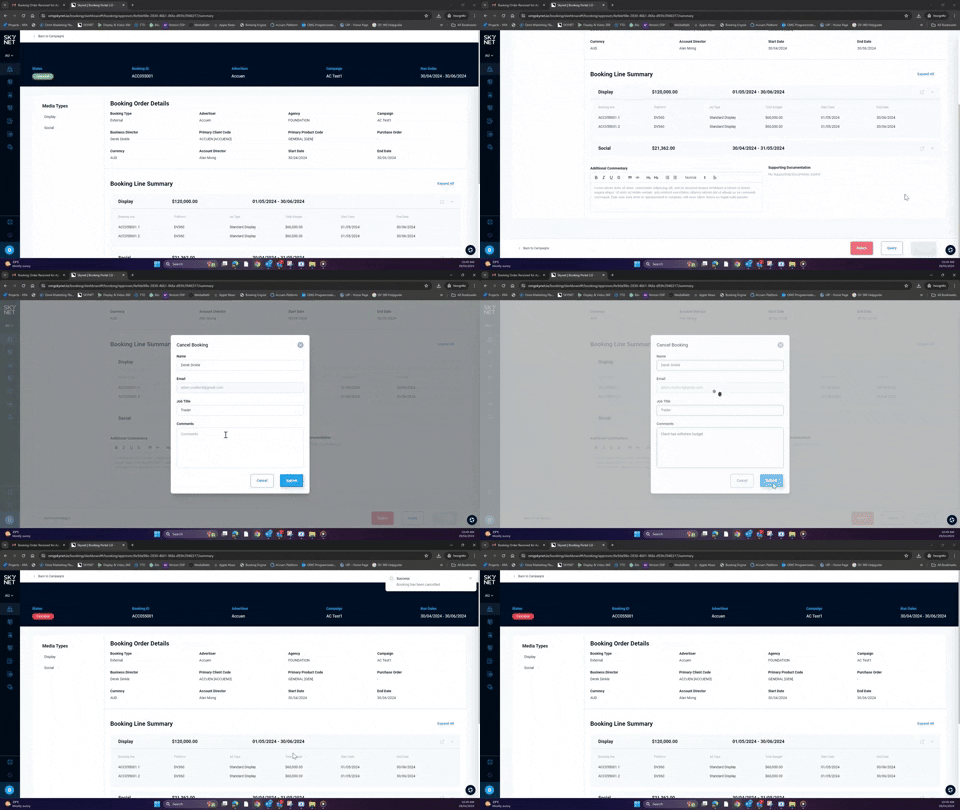
The booking will open on the summary screen. Approval buttons are at the footer of the screen.
- Click Reject. A modal will open to finalsie the cancellation of the booking.
Click Cancel to close the modal and return to the summary page. This will not cancel the booking.
- Add Comments. These comments will be shared back to the activation team. A comment outlining the cancellation reason is required.
- Click Submit.
The status of the booking will update to Cancelled and alert the activation team via email they can proceed with campaign implementation.